

Reacher Stephen
TikTok Seller Shop Guide: Seller Center Login, Sign Up, and USA Setup
Learn how the TikTok seller shop works: sign up, log in to TikTok Shop Seller Center, verify a USA account, use the app, and manage orders, analytics, and affiliates.

tiktok seller shop
The TikTok seller shop setup begins in TikTok Shop Seller Center, the web workspace for registering your U.S. business, submitting verification details, and preparing to sell. Gather your business and tax information before you start, then use the official Seller Center registration and login pages to manage access.
Key Takeaways
- TikTok Shop Seller Center is the central workspace where U.S. sellers register their business, complete verification, and manage daily selling operations.
- Preparing your business and tax documents before registration makes the setup process faster and reduces the risk of verification delays.
- Always use the official Seller Center registration and login pages to protect your account access and keep your credentials secure.
- A properly configured seller shop lays the foundation for scaling revenue through TikTok's creator-driven commerce ecosystem.
Once approved, use the same account to maintain shop information, review platform tasks, and connect sales activity with TikTok content. Careful setup makes the transition from registration to operating your shop more organized.
What TikTok Shop Seller Center Is and Who It's Built For
TikTok Shop Seller Center is TikTok’s seller workspace for setting up and operating a shop. Sellers use it for onboarding and verification, shop details, and tools associated with selling through shoppable videos, LIVE shopping, and creator marketing. It is designed for businesses that want to sell products through TikTok Shop and coordinate commerce with content.
Your Shop's Control Room: What Seller Center Actually Controls
Seller Center is the operational account behind your storefront. It brings registration and shop administration together, while TikTok’s seller signup materials describe sales channels including shoppable videos, LIVE shopping, and creator marketing. These channels suit sellers whose products benefit from demonstration, styling, or creator-led discovery.
Content fit matters during planning. Research from Quickfire Digital identifies fashion, beauty, cosmetics, and jewelry as categories that align well with content-led selling, while bulky household goods and furniture can be less naturally suited to the format. Consider how easily a shopper can understand a product through short-form video before investing time in setup.
Key Takeaways Before You Sign Up
Before registration: Choose the correct U.S. business identity, prepare accurate tax and contact information, and confirm access to the email, phone, or linked account you plan to use. TikTok’s registration flow supports four signup methods: email, phone number, TikTok account, or third-party login.
- Use business details that match your verification documents.
- Keep login credentials and recovery methods available to the person responsible for shop operations.
- Plan for verification, tax setup, fulfillment configuration, compliant listings, and a connected content account as possible parts of onboarding.
U.S. Seller Requirements: Documents, Tax Info, and Account Prerequisites
Requirements depend on whether you register as an individual or a business, so follow the prompts in the official U.S. flow rather than relying on a generic document list. Have your legal name or registered business name, contact details, and requested identity or business verification documents ready. Enter tax information carefully and make sure it corresponds to the seller identity being registered.
Prepare a fulfillment plan and review the product rules that apply to your catalog. Business verification, tax details, shipping settings, compliant product information, and a connected content account can all affect readiness. Consistent records help reduce avoidable review delays.
TikTok Seller Sign Up and Login: Step-by-Step for USA Sellers
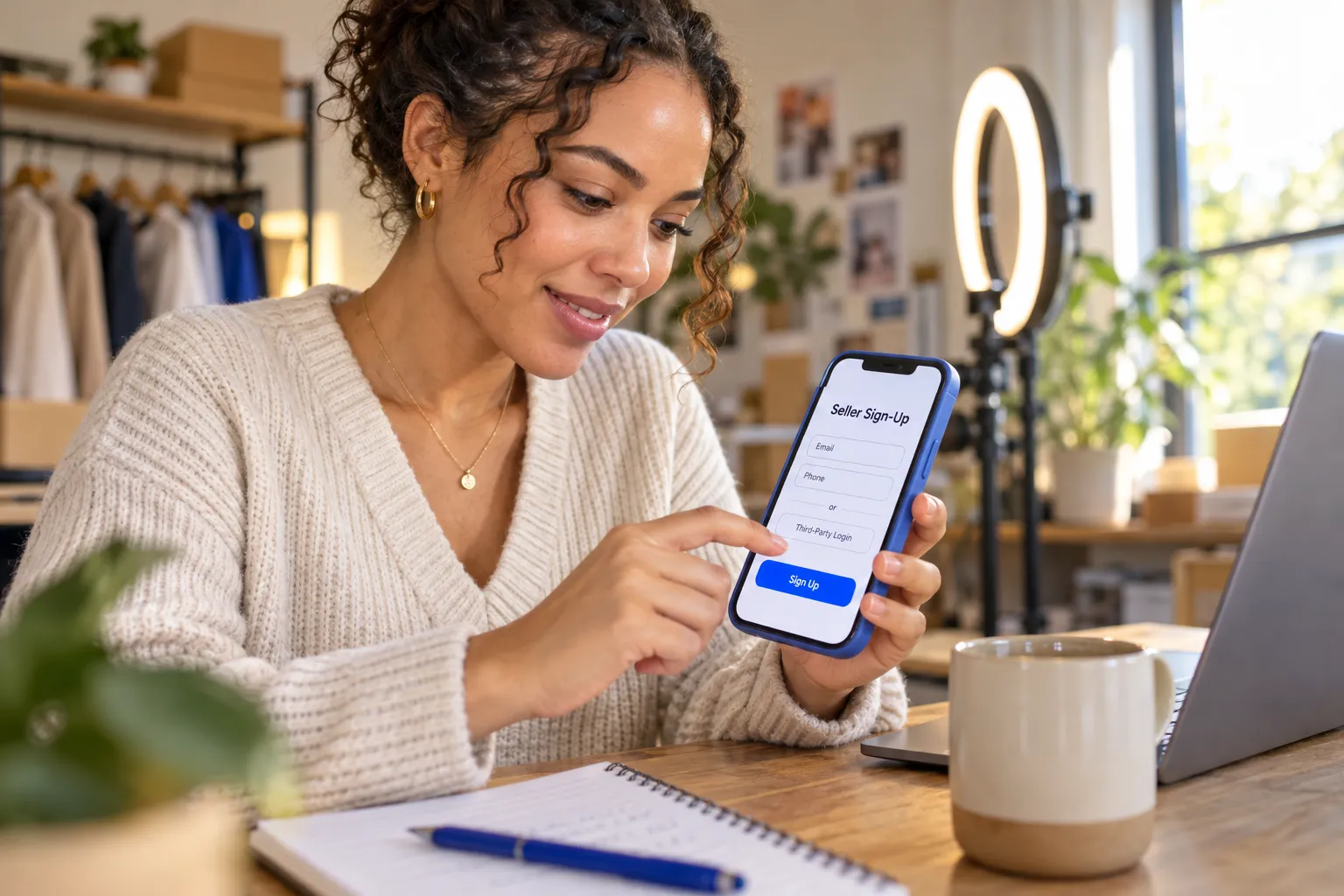
How to Sign Up for a TikTok Seller Shop Account (Email, Phone, or Third-Party Login)
Start from TikTok’s official U.S. seller registration page. The TikTok Shop seller sign up flow offers email, phone number, TikTok account, or third-party login methods. Select an account method you can reliably access, since that credential may also be needed for verification messages and account recovery.
- Open the official U.S. Seller Center registration page and choose a sign-up method.
- Enter the requested account and seller details, then verify the contact method when prompted.
- Select the appropriate seller type and submit the requested identity, business, and tax information.
- Complete additional onboarding prompts, including shop details and fulfillment setup.
- Check the account for review notices or missing requirements before adding products.
Use accurate information from the beginning. Mismatches between the seller profile and verification records can create extra review steps, so confirm spelling, business identity, and contact details before submission.
TikTok Seller Login: Accessing TikTok Shop Seller Center USA
For the TikTok seller login, go to the official U.S. Seller Center login page and use the sign-in method selected during registration. Access TikTok Shop Seller Center through its web portal; after authentication, follow prompts requesting verification or completion of onboarding.
If you manage shop access with a team, keep the login method and recovery contact in a secure location. Avoid opening a seller session through an unfamiliar link. Start from TikTok’s official Seller Center destination and confirm the account is the correct shop before making changes.
Login Troubleshooting Checklist: Password Resets, 2FA Issues, and Locked Accounts
If login fails, identify whether the issue is a forgotten password, a verification code, or an account restriction. Work through these checks using the recovery prompts on the official login page:
- Password: Confirm the email or phone number tied to registration, then use the password-reset option.
- Verification code: Check the correct inbox or device, review spam folders, and request a new code after confirming the contact information.
- Two-step verification: Use the registered recovery method and check that your device has service and the correct time settings.
- Account lock or review: Read any on-screen notice and follow the stated appeal or support process. Do not create duplicate accounts to bypass a restriction.
Security reminder: Never share passwords or verification codes with someone claiming to restore access. Use the platform’s account recovery process and retain any support case details.
Is There a TikTok Shop Seller Center App or APK for Mobile?
For mobile access, check TikTok’s official app listings and Seller Center guidance in your region. Availability and features can change, so verify the publisher and current listing before installing anything. Search interest in a TikTok seller center app or TikTok Shop Seller Center APK does not establish that a particular download is official or suitable for your account.
If an app is unavailable or its capabilities do not cover a task, use the official web Seller Center in a current browser. Avoid unofficial APK files: they can expose credentials or install software outside the store’s review process. A mobile browser or verified app is the safer route for checking account status away from a desktop.
For separate TikTok market research, FastMoss TikTok Data Analytics Platform is a distinct analytics resource. It does not replace seller registration, account verification, or official account recovery.
Inside the Seller Center Dashboard: Orders, Products, Analytics, and Finance
Seller Center is the daily operations workspace for keeping a shop ready to sell. Follow a consistent order: check new orders, review fulfillment status, maintain product listings, then assess performance and payouts. The dashboard’s layout and tools can change, so use the labels and prompts displayed in your account as your source of truth. A routine helps you catch shipping exceptions, listing issues, and account notices before they disrupt the customer experience.
Order Management and Fulfillment: Shipping, Tracking, and Returns Setup
Open the order area to review unfulfilled purchases, processing status, shipping information, and return requests. Confirm each order has the right item and address details, then follow the fulfillment instructions shown in Seller Center. After shipping, check that tracking information is recorded and the status updates correctly. Watch orders awaiting action, since a missed processing step can delay delivery and create a poor buyer experience.
Dashboard callout: Treat pending, shipped, delivered, and returned as separate work queues. If an order is delayed or a return needs attention, review the order record and follow the platform’s displayed procedure.
Product Listings and Catalog Compliance
Use the product area to add items and maintain your catalog. Check each listing for an accurate title, category, description, price, inventory quantity, and clear product images. Product claims and details should match the item customers receive. Review policy prompts in your account and correct incomplete or flagged information before relying on a listing for sales. Consistent product details support smoother order processing for buyers and fulfillment teams.
Preview the product page as a shopper would see it before publishing. Confirm variations, such as size or color, are labeled correctly and inventory reflects what you can fulfill. Recheck listings when product specifications or stock levels change.
Analytics, Promotions, and Payouts: Reading the Numbers That Matter
Analytics help you assess product and shop activity; promotions let you manage eligible offers, while the finance area provides payout and transaction information. Review order volume alongside product views, conversion behavior, returns, and promotion costs where available. This context helps distinguish a listing that attracts attention from one that turns visits into completed purchases.
| Dashboard area | What to review | Operational action |
|---|---|---|
| Orders | Unfulfilled purchases and status exceptions | Resolve the next required fulfillment step |
| Products | Listing details, stock, and review notices | Correct inaccurate or incomplete information |
| Analytics | Traffic, sales activity, and product trends | Adjust content or merchandising based on observed behavior |
| Finance | Transactions and payout status | Reconcile records and investigate discrepancies |
For broader market research, the FastMoss TikTok Data Analytics Platform offers Track competitor performance, Discover top products, Creator analytics, Viral trend detection, Live performance tracking, and Data accuracy with 90% reliability guarantee. It is a separate research resource, not a replacement for Seller Center’s account, order, or payout records. Reconcile platform transactions with your own bookkeeping and follow the finance details shown in your account.
Affiliates, Product Seeding, and Scaling Your TikTok Seller Shop
Affiliate activity connects eligible creators with products they can feature through TikTok content. Product seeding adds a sample-based workflow: identify an appropriate product, confirm the creator’s interest and shipping details, then track whether the sample leads to content or sales. TikTok’s seller materials describe creator marketing as a route to buyers alongside shoppable videos and LIVE shopping. Set clear campaign terms and assess creator fit by audience, content style, and product relevance rather than reach alone.
Running Affiliate Campaigns and Seeding Products to Creators
Start with a small, focused campaign. Select products that are easy to demonstrate, define the commission or campaign terms available in your account, and prepare a concise brief with accurate product details. Track invitations, accepted collaborations, sample shipments, published content, and resulting shop activity. Smaller creators can suit merchants with limited budgets; Quickfire Digital notes that micro-influencers can deliver higher ROI for smaller merchants than high-fee, big-name influencers. Treat that as planning context, not a guaranteed outcome.
Outreach template: “Hi [Name], we’re inviting creators to feature [product] for [audience or use case]. The collaboration includes [sample or terms]. If it fits your content, please review the product details and let us know whether you’d like to participate.”
Security Checklist: Protecting Your Seller Credentials and Account Recovery
Protect shop access with consistent controls:
- Use a unique password and keep it in an approved password manager.
- Limit account access to team members who need it for their roles.
- Keep recovery email and phone details current, and never share verification codes.
- Review account notices and sign-in activity; use official recovery steps if access is lost.
Where Automation Fits: Managing Creator Relationships at Scale
As creator outreach expands, a shared system helps your team organize discovery, messages, campaign briefs, and relationship history. Reacher supports AI creator discovery, automated outreach, competitor insights, creative brief generation, and CRM for managing campaigns and creator networks. These tools help teams coordinate creator work; they do not replace sound product selection, clear collaboration terms, or campaign outcome review. To scale your TikTok Shop revenue, define a workflow, then automate repetitive coordination where it saves time.
Next step: Map your current creator process from discovery through follow-up, identify repeated steps, and explore Reacher’s AI-powered creator management tools to organize that work as your network grows.
TikTok Shop Seller Center vs. Shopee and Lazada: Which Marketplace Dashboard Fits You?

Choose a seller dashboard based on where your customers shop and how you plan to sell. TikTok Shop Seller Center connects product listings with shoppable videos, LIVE shopping, and creator marketing. Shopee Seller Center and Lazada Seller Center serve marketplace operations across the regions where those platforms operate. For U.S. sellers building sales around TikTok content, Seller Center is the relevant workspace; businesses selling across Southeast Asia should assess local marketplace tools and requirements in each target country.
There is no universal winner. Your decision depends on audience location, product fit, fulfillment capacity, and the sales channels your team can support. Compare current requirements in your account before committing to a marketplace, since fees, eligibility, and available features vary by country and can change.
Regional Differences: TikTok Shop Seller Center USA vs. UK vs. Southeast Asia
Seller Center access and shop operations are region-specific. A U.S. account follows U.S. onboarding, verification, tax, and fulfillment prompts. Sellers in the UK or Southeast Asia should use their market’s registration flow and confirm local eligibility, document requirements, shipping options, and account features. Do not assume that an account or setup process from one region will transfer to another.
For cross-border teams, record the country attached to each shop and assign an owner to monitor local policy notices. Product availability, payment arrangements, and delivery workflows may differ by market. Treat regional setup as a separate operating checklist, not a copied version of the U.S. process.
Comparison Table: Fees, Payouts, and Dashboard Capabilities
The table compares each dashboard at an operational level, not by quoted rates. Marketplace charges, payout schedules, and seller eligibility depend on country, category, and current platform terms. Verify those details in the relevant seller account before estimating margins or setting a cash-flow plan.
| Seller workspace | Operational focus | Fees and payouts | Best fit to assess |
|---|---|---|---|
| TikTok Shop Seller Center | Shop administration tied to TikTok commerce and content activity | Check current country and category terms in the account | U.S. sellers using video, LIVE, or creator-led product discovery |
| Shopee Seller Center | Marketplace shop and order operations in supported markets | Confirm local charges and payout details with Shopee | Merchants targeting shoppers in Shopee markets |
| Lazada Seller Center | Marketplace listing and selling operations in supported markets | Check market-specific seller terms and settlement information | Businesses serving customers in Lazada markets |
For TikTok market research alongside daily shop administration, the FastMoss TikTok Data Analytics Platform offers Track competitor performance, Discover top products, Creator analytics, Viral trend detection, Live performance tracking, and Data accuracy with 90% reliability guarantee. It is a separate analytics resource, not a replacement for any marketplace’s seller dashboard or financial records.
TikTok Seller Shop FAQs
Which dashboard should a U.S. TikTok seller use? Use TikTok Shop Seller Center for TikTok Shop account and shop operations. Other marketplace dashboards apply to their supported markets and services.
Can one dashboard manage shops in every country? Do not assume so. Check each platform’s regional registration flow and account permissions. Country-specific verification, fees, payout terms, and fulfillment options can differ.
How should I decide between TikTok Shop and a regional marketplace? Start with buyer location and product fit. Then compare eligibility, total selling costs, payout timing, shipping workflow, and the content or marketplace activity your team can maintain. Recheck current terms before expanding, since regional availability and platform rules can change.
Frequently Asked Questions
How can you become a seller on TikTok Shop?
You become a seller on TikTok Shop by registering through TikTok Shop Seller Center, the official web workspace for U.S. sellers. Submit your business or individual identity details, verification documents, and tax information, then complete onboarding steps like shop details and fulfillment setup before adding products.
What is the TikTok Shop Seller Center app?
TikTok Shop Seller Center is TikTok's seller workspace for setting up and operating a shop, accessible through its web portal. Sellers use it for registration, verification, shop administration, and managing sales channels like shoppable videos, LIVE shopping, and creator marketing.
How much does it cost to set up a TikTok Shop?
Registering a TikTok seller shop through Seller Center is free; TikTok does not charge an upfront setup fee for creating your seller account. Your real costs come from inventory, fulfillment, compliant product listings, and content or creator investment to drive sales.
How do I log in to TikTok Shop Seller Center in the USA?
Go to the official U.S. Seller Center login page and sign in with the method you chose during registration, whether email, phone number, TikTok account, or third-party login. Always start from TikTok's official destination rather than an unfamiliar link, and keep your recovery contact in a secure location.
What documents do I need to sign up as a TikTok seller?
Requirements depend on whether you register as an individual or a business, so follow the prompts in the official U.S. flow. Have your legal or registered business name, contact details, identity or business verification documents, and tax information ready, ensuring all records match to avoid review delays.
What should I do if I can't log in to my TikTok seller account?
Identify whether the issue is a forgotten password, a missing verification code, or an account restriction, then use the recovery prompts on the official login page. Never share passwords or codes with anyone claiming to restore access, and do not create duplicate accounts to bypass a restriction.
What products sell best on TikTok Shop?
Products that demonstrate well in short-form video perform best on TikTok Shop. Research from Quickfire Digital identifies fashion, beauty, cosmetics, and jewelry as strong fits for content-led selling, while bulky household goods and furniture are less naturally suited to the format.