

Reacher Stephen
TikTok Coupons 2026: How to Find, Test, and Stack Promo Codes for Maximum Savings
Discover the latest TikTok Shop promo codes for 2026, learn how to test and stack coupons for first orders, and troubleshoot failed codes with our expert tips.

tiktok coupons 2026
To find usable tiktok coupons 2026, start with offers shown in TikTok Shop, then test the discount in your cart before paying. Codes change by seller, account, product, and promotion period, so a code posted on a coupon site is a lead to verify, not a guarantee.
Key Takeaways
- TikTok Shop is the most reliable starting point for locating active 2026 coupon offers before you ever reach checkout.
- Always confirm the discount in your cart before completing payment, since a listed code does not guarantee it will apply.
- Coupon eligibility shifts based on the seller, your account status, the specific product, and the promotion window.
- Treat codes found on third-party coupon sites as leads to verify rather than confirmed savings.
This guide shows you how to identify the offer type, confirm eligibility, and compare a promo code with automatic savings. The fastest way to avoid disappointment is to check the final order total before submitting payment.
TikTok Coupons 2026: Your Quick Answer and Current Code Types
The best TikTok Shop promo code is the one that appears as valid for your account and products at checkout. Look for offers in the Shop, on a product listing, or in a seller’s promotion. Apply the code before placing your order, then confirm the discount appears in the order summary. Search results for “tiktok shop promo code today” or “tiktok promo code june 2026” can point you toward offers, but only checkout confirms whether a code is active and eligible for you.
What TikTok Shop Promo Codes Look Like in 2026
A promo code is a discount applied to an eligible order under specific terms. It may be a code you enter or an offer you claim in the app. The terms can set a minimum spend, eligible products, a redemption window, or account requirements. “TikTok codes” found on coupon pages may be seller-specific, limited to new customers, or already expired. Treat claims such as “tiktok promo codes free” as a search phrase, not proof of an available discount.
Percentage Off, Dollar Off, Free Shipping, and BOGO: Know Your Code Types
Check what each offer reduces before comparing codes. Percentage discounts scale with eligible item value, while a fixed-dollar offer takes a set amount off once you meet its terms. Free-shipping offers reduce delivery charges, and buy-one-get-one (BOGO) promotions apply to qualifying product combinations. The strongest-looking offer may not create the lowest total if shipping, exclusions, or minimum spend change the calculation.
| Offer type | What it changes | What to verify |
|---|---|---|
| Percentage off | Eligible item price | Excluded products and discount limit |
| Dollar off | Order or item price | Minimum spend and eligible items |
| Free shipping | Delivery charge | Shipping method and location terms |
| BOGO | Qualifying product pair | Which items must be added to the cart |
Platform-Wide vs. Seller-Specific Codes: The Difference That Decides Whether Your Code Works
Platform-wide offers are issued for broader use, though they may still have account, category, or order limits. Seller-specific codes apply to selected products or a particular shop. Check the offer details and seller name before adding items. If you are comparing “tiktok shop coupons retailmenot” with an in-app offer, use the same product and cart to test both. The checkout total, not the label on a coupon listing, determines which saves more.
Current TikTok Shop Promo Codes and How to Verify They Work Today
There is no single public code list that guarantees an active discount for every shopper. Open the offer in TikTok Shop, review its conditions, add qualifying items, and apply the code at checkout. Recheck the total after selecting shipping, since delivery charges can affect your savings. The FastMoss TikTok Data Analytics Platform helps brands monitor product and creator activity; it is not a source of shopper promo codes. Brands can use the FastMoss TikTok Data Analytics Platform for market analysis, while shoppers should verify codes directly in their cart.
- Confirm the offer has not passed its expiration date.
- Check minimum spend, eligible products, and account restrictions.
- Make sure the code is entered correctly and accepted.
- Review the final order total before placing the order.
How to Apply a TikTok Shop Promo Code at Checkout (Step by Step)
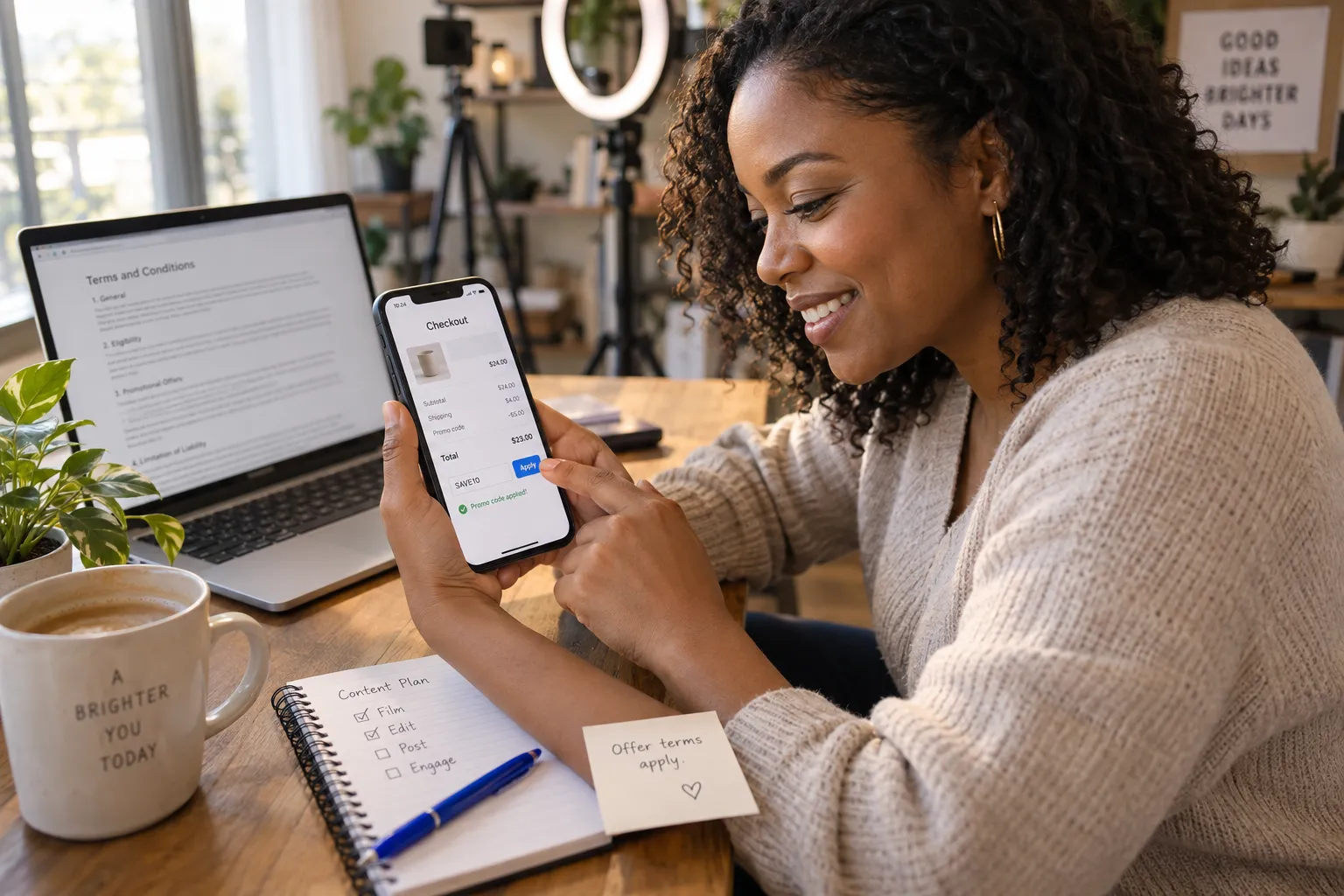
Applying a Code on Mobile: The Exact Checkout Flow
Keep the offer terms visible while you check out. A code can appear accepted yet apply only to certain items, so inspect the order summary before paying.
- Open the product listing and confirm the item qualifies for the offer.
- Add the item to your cart and select the correct size, color, or variation.
- Open checkout and find the coupon, promotion, or discount field.
- Enter the code exactly as shown, or select an available claimed offer.
- Review item discounts, shipping, taxes, and the final total before submitting your order.
First-Order and New Customer Discounts: How to Claim Them
A “tiktok shop promo code first order” offer may be limited to eligible accounts, products, or a minimum purchase. Check whether the promotion requires a new customer account or a first purchase from a specific seller. Claim the offer in the app if prompted, then confirm it appears in checkout. Do not assume a code applies just because you have not bought that item before; the restriction may refer to your account’s purchase history or another stated condition.
Automatic Discounts vs. Promo Codes: Which Saves You More?
Compare the final payable total in the same cart. An automatic markdown may already reduce the item price, while a promo code might apply to a different portion of the order or fail to combine with that sale. Record the total with the automatic offer, then test the code and compare again. Keep the option that produces the lower eligible total after shipping and other listed charges.
- Automatic offer: Best when the reduced price is already visible and no code is needed.
- Promo code: Worth testing when its terms cover your items and the checkout total falls further.
Combining Codes, Flash Sales, Free Shipping, and Bundle Deals Without Losing Savings
Do not assume every discount stacks. Add the items needed for a bundle or sale, claim eligible shipping offers, and test the code one at a time. Check the order summary after each change, since applying one promotion may replace another. Compare the final total for each valid setup, including any minimum-spend condition. A lower listed item price does not always mean a lower order total if a shipping benefit disappears or the code excludes sale products.
Use this quick decision path: if the code is accepted and lowers the final total, keep it. If the checkout removes another discount, compare both totals. If the code adds no savings, remove it and retain the better automatic offer or bundle price. That real-time comparison makes tiktok coupons 2026 a practical savings method rather than a hunt for codes that may not apply.
Why Isn't My TikTok Promo Code Working? A Troubleshooting Checklist
A rejected discount usually points to a specific condition, not a checkout glitch. Check the code’s terms against your account, cart, and order total before trying another offer. Codes found through searches for tiktok coupons 2026 may be expired or restricted, so treat a coupon listing as a lead and let checkout confirm eligibility.
The 7 Most Common Reasons Codes Fail (Expired, Minimum Spend, Eligibility, Account Status)
Start with these common causes. Read the offer details as you check each one, since the reason may be stated there even if checkout shows only a general error.
- Expiration: The redemption window has ended, or the offer has not started.
- Minimum spend: Eligible items do not meet the required subtotal.
- Product exclusions: One or more cart items are not included.
- Account eligibility: The offer is limited to new customers or selected accounts.
- Seller restriction: The code applies only to products from a specific shop.
- Redemption limit: The offer has reached its usage limit or cannot be used again on your account.
- Entry error: Extra spaces, a mistyped character, or an incorrect code can prevent acceptance.
A Step-by-Step Troubleshooting Flowchart for Failed Codes
Use this diagnostic sequence in your cart. Change one condition at a time so you can identify what fixes the error without losing track of the original order total.
- Does the code match the offer? Copy it again from the source and check for spaces or confusing characters. If it still fails, continue.
- Is the offer active? Check its start and end dates. If the date is valid, continue.
- Does your cart qualify? Confirm the seller, product, account status, and minimum eligible subtotal. Remove excluded items or add qualifying products only if the purchase still makes sense.
- Is another offer interfering? Temporarily remove other discounts, then test the code. Compare the final totals before choosing an offer.
- Still rejected? Save a screenshot of the terms and error message, then contact the seller or TikTok Shop support through the app.
When to Use the Code Anyway: Contacting Sellers and Timing Your Purchase
Do not place an order expecting a failed code to be applied later. If the offer appears active and your cart meets its terms, message the seller with the product name, code, and a screenshot of the checkout error. Ask whether the code is still available or whether an eligible item is missing. If the seller cannot confirm the discount, compare the current order total with the price you are willing to pay and wait for a verified offer rather than buying on speculation.
Quick check: If checkout accepts the code and shows a lower total, you can use it. If it remains invalid after you verify the terms, do not rely on the coupon listing alone. Sellers can confirm their own offers; they cannot guarantee that a platform or account restriction will be changed.
For brands investigating how shop activity and creator campaigns relate to promotions, the FastMoss TikTok Data Analytics Platform offers market analysis, not shopper coupon validation. The FastMoss TikTok Data Analytics Platform is a separate tool for brand-side research, not a way to make a rejected code work.
Maximize Savings: 2026 Sales Calendar, Stacking Strategy, and Smart Couponing
Build your shopping plan around events and verified offers, not countdown pressure. A deal’s advertised percentage is only a starting point: check the eligible products and final price, then compare that total with your budget and other available offers. Planning ahead makes tiktok coupons 2026 more useful because you can wait for a relevant sale instead of buying an item solely because a timer is running.
2026 TikTok Shop Sales Calendar: Black Friday, Cyber Monday, and For You Days
Use the calendar as a prompt to check for promotions, not as a promise that a particular discount will be available. Event dates and offer terms can vary by seller, product, and account. Add items you already plan to buy to a shortlist, then review their prices when seasonal campaigns begin. For You Days and other platform promotions may have different timing from major retail events, so check TikTok Shop directly for announcements and eligible deals.
| Shopping window | What to check | Smart move |
|---|---|---|
| For You Days | Featured products and seller offers | Compare eligible listings before choosing an item |
| Black Friday | Price changes on shortlisted products | Check the item total and shipping together |
| Cyber Monday | Digital promotions and limited-time deals | Review the offer terms before the event ends |
| Daily flash sales | Start time, end time, and stock availability | Buy only if the price fits your budget |
Stacking Coupons with Cashback Apps and Rewards Programs
Think of stacking as comparing eligible benefits, not assuming every promotion combines. First check whether TikTok Shop permits the selected seller offer alongside an automatic discount. Then review any cashback app or card rewards program separately, including its merchant terms, tracking requirements, and exclusions. Some programs may not credit a purchase made through another app or after changing the checkout path. Confirm the order total before paying, and treat cashback as a possible later benefit rather than an immediate price reduction. Keep screenshots or confirmation details until the reward posts.
Practical sequence: identify the eligible shop offer, compare the cart total with and without it, then check whether an outside rewards program allows the same purchase route. Choose the combination with clear terms and the lowest confirmed cost.
Avoiding the Impulse Buy Trap: The Psychology of Promo Codes
A discount can make an unnecessary item feel urgent. Before purchasing, ask whether you wanted the product before seeing the promotion, whether the price fits your planned spending, and whether you would still buy it without the countdown. Set a maximum price in advance and compare the total, including delivery. A coupon saves money only when it reduces the cost of something you intended to buy; spending extra to reach a minimum threshold can erase the benefit.
For Brands and Sellers: Creating Promo Codes That Convert on TikTok Shop

For sellers, a code is a campaign tool: it gives shoppers a clear reason to act and gives your team a way to assess promotion performance. Set a specific goal before launch, such as introducing a product, supporting a seasonal push, or measuring creator-driven sales. Then align the discount, eligible products, and redemption window with that goal. A well-defined offer is easier for creators to explain and shoppers to understand.
Seller-Specific vs. Platform-Wide Codes: Which to Run and When
Choose seller-specific codes when you want to focus a promotion on selected products or measure a defined campaign. They give you tighter control over eligible items and messaging. Broader platform offers can support wider discovery, though their availability and terms are not fully controlled by an individual seller. Decide based on the audience, margin, and campaign objective. Before publishing, confirm the code’s eligible products, dates, redemption limits, and any minimum purchase requirement.
Promoting Codes Through Creators for Maximum Redemption
Give each participating creator a concise brief: the product’s intended audience, the code’s exact terms, the redemption deadline, and a clear call to action. Ask creators to show the product in use and state any restrictions plainly. Use distinct codes or tracking methods when available so you can compare creator activity and redemption outcomes. Review comments and audience questions during the campaign, then clarify confusing terms quickly. Avoid promising savings that the checkout offer does not support.
- Confirm the offer works for the featured product before the creator posts.
- Provide accurate wording for discount terms and timing.
- Track content activity and code results against the campaign goal.
How Reacher Automates Creator Campaigns That Drive Code Redemptions
Reacher helps brands organize creator campaigns around measurable outcomes, from partner selection to performance review. For market and creator research, the FastMoss TikTok Data Analytics Platform supports teams assessing product activity and creator performance. Its capabilities include Track competitor performance, Discover top products, Creator analytics, Viral trend detection, Live performance tracking, and Data accuracy with 90% reliability guarantee. Pair research with clear offer terms and campaign tracking so your team can see which creator activity contributes to code redemptions. The FastMoss TikTok Data Analytics Platform is a brand-side analytics resource, not a shopper coupon source.
Next step: Define one campaign objective, set an offer your margins can support, and match creators to the product audience. Use Reacher to coordinate creator activity, then review performance and redemption data to guide your next promotion.
Frequently Asked Questions
Where do I find TikTok coupons for 2026?
TikTok coupons 2026 are found inside TikTok Shop, on product listings, and in seller promotions within the app. Codes listed on coupon sites are leads to verify, not guarantees, so always test the discount in your cart and confirm the final order total before paying.
How do you get coupons in 2026 on TikTok Shop?
You get coupons in 2026 by opening TikTok Shop, claiming available offers in the app, and meeting each promotion's stated terms. Offers may require a minimum spend, specific products, a new customer account, or redemption within a set window, so review the conditions before checkout.
Do TikTok Shop promo codes work for first orders?
TikTok Shop first-order promo codes often work, but they may be limited to new customer accounts, specific sellers, or a minimum purchase amount. Claim the offer in the app if prompted, then confirm the discount appears in your checkout summary before placing the order.
Why is my TikTok promo code not working?
A TikTok promo code fails when it is expired, seller-specific, restricted to certain products, or tied to account requirements your profile does not meet. Codes can also fail if entered incorrectly, so copy the code exactly and verify eligibility in the order summary.
Should I use an automatic discount or a promo code on TikTok Shop?
The better choice is whichever produces the lower final payable total in the same cart. Record the total with the automatic offer applied, then test the promo code, since a code may not combine with sale prices or may cover only part of your order.
Can I stack multiple TikTok Shop discounts on one order?
Stacking is not guaranteed on TikTok Shop, because codes, flash sales, bundles, and free shipping offers each carry their own terms. Add all qualifying items, claim eligible shipping offers, then apply codes one at a time to see which combination TikTok Shop accepts.
How do brands track TikTok Shop promotions and creator campaigns?
Brands track TikTok Shop promotions and creator campaigns using analytics platforms like FastMoss, which offers AI Creator Discovery, Automated Outreach, campaign management tools, and a Halo Effect Tracker. Shoppers should verify promo codes directly in their cart, since FastMoss is a market analysis tool, not a coupon source.